Help Docs/Goal Planner
Goal Planner
Turn an ambitious outcome into a clear, realistic plan. Goal Planner defines your objective, timeline, and daily effort, then generates steps that match your current ability and constraints.
What you will achieve
- Define a specific goal with a measurable outcome.
- Set a timeline and daily time commitment that is realistic.
- Generate a step-by-step plan you can execute.
- Refine the plan until it matches your real life.
Before you start
- Know your start date and your daily commitment (hours or minutes).
- Capture any constraints (schedule, tools, experience level).
- AI planning is available during trial and on Goaliath Full System. Free Basic accounts can still use the manual planner.
Step-by-step
- First visit welcome: If this is your first time in Goal Planner and you do not have any goals yet, Goaliath opens a short welcome modal here with guidance on what this page does. Once you close it, it will not appear again. During that first visit, Goaliath also keeps the separate life-values prompt out of the way so your focus stays on creating the first goal.
- Choose a planner mode: Use the Manual Form for full control. If the AI planner is available on your account, the main Goal Planner page opens straight into the build form. Use the small information icon next to the green Build The Goal label for a quick explanation of what this page does and what happens after you submit.
- Free Basic reminder: Free Basic accounts see a short reminder banner on the manual planner page explaining that manual planning stays available while AI planning is part of the paid plan. You can dismiss that banner permanently.
- Define the goal: Enter a clear outcome, timeline, daily commitment using hours and minutes, and a daily start time. The page now follows a cleaner sequence: core inputs first, then goal quality check, then plan creation.
- Automatic if-then plan: When you create the goal, Goaliath also creates an Implementation Intentions entry from the goal title, daily start time, daily commitment, and optional location. For example, a one-hour goal starting at 10:00 AM becomes a cue like "If it is 10:00 AM, then I will work on my goal "[goal]" for 1 hour." If the commitment uses minutes or mixed hours and minutes, the wording adjusts automatically.
- Latest timeline card stays scoped to the same goal: When Goal Planner shows the latest generated step list, the implementation-intention card above it is built from that same goal record so it matches the steps directly underneath.
- Add optional context: Open Add optional context to include location, skill level, progress, and constraints so the plan starts where you actually are.
- Decide life values first if prompted: If you have not saved any life values yet, Goal Planner shows a small reminder at the top of the page. Use Decide life values to open Values Alignment, then return to planning with clearer direction.
- Review saved life values: If AI feedback has inferred life values for your account, use the Life values button above Step 1 to view the names and reasons in a modal.
- Life values context (automatic): If you have inferred life values or saved Values AI feedback, Goal Planner uses it when generating milestones, habits, action steps, and to-dos so the plan stays aligned with your stated values.
- Run a goal quality check: Keep Run goal quality check enabled to validate clarity before you create the plan. The check also considers optional context like location and current experience when you provide it. Use the Check goal button in the form, and review checker feedback directly under Step 1 in the same flow.
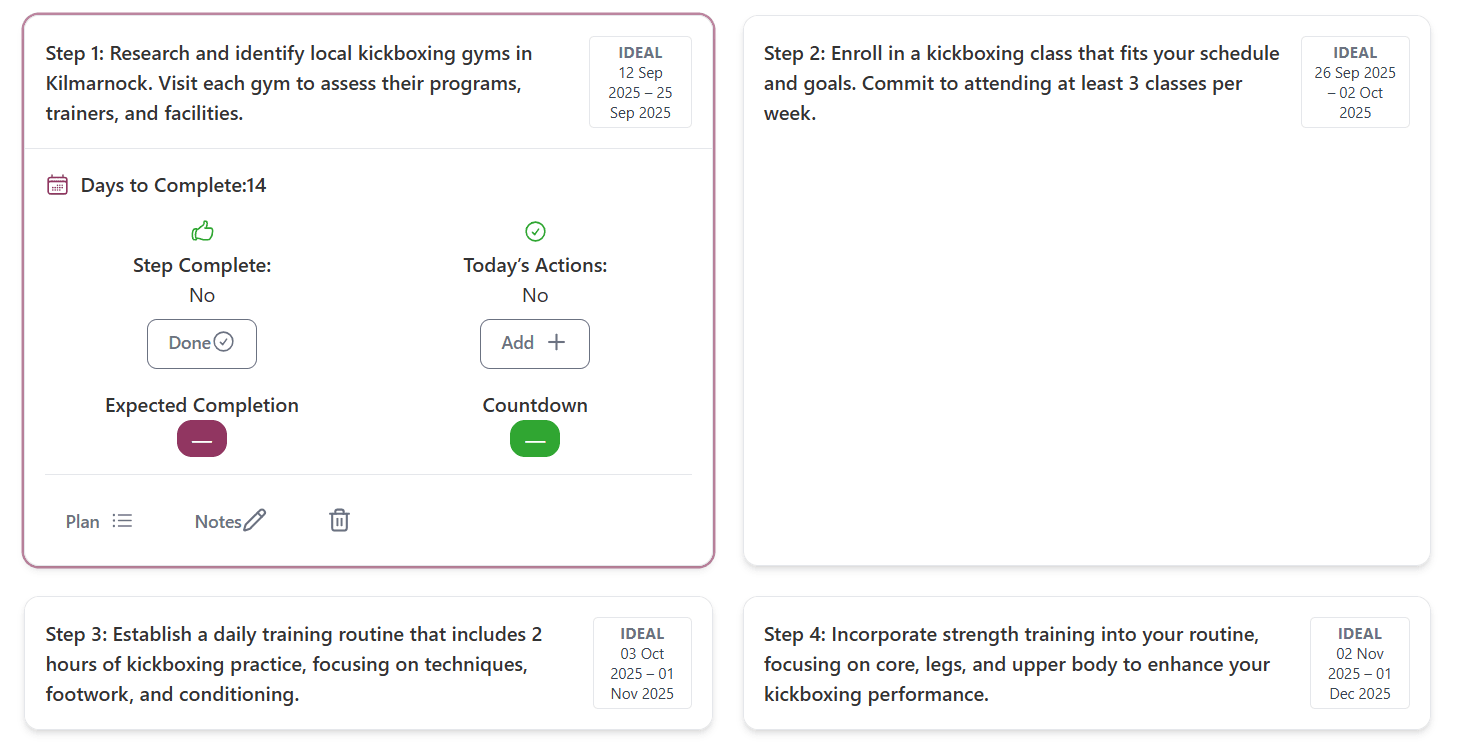
- Completion locks steps: When a step is finished it is shown with a strike-through and can't be run again until you refresh the page.
- Quality level panel: A desktop side panel shows your current evidence level (Basic, Strong, Execution-ready) based on which stages you completed.
- Break into steps (Step 2): Create from the Step 2 card to generate your timeline steps after required checks are done (or skipped by choice).
- Manual steps example: In the manual planner, use the small information icon next to Steps to open a visual example that shows exactly how step descriptions and day estimates should be entered.
- Review Goal Stack recommendations: After a goal is created, Goaliath can suggest built-in support tools for supported goal families. This recommendation appears below the generated steps, not above them, so the plan stays primary.
- Only live tools are recommended: Goal Stack now only shows tools that already exist in the product. You can keep the recommended tools, untick anything you do not want, or choose Not now and come back later.
- Saving Goal Stack tools keeps the timeline visible: When you save that recommendation box, the current generated steps should stay on screen while the tool box dismisses.
- Use family-specific tool hubs when they appear: If the saved goal lands in a supported family such as health, business, or study, Goaliath can also show a matching tools hub in the dashboard tool area so the most relevant support is easier to find later.
- Steps pages stay execution-first: Goal Stack settings are no longer shown on the goal steps view, so once the plan is generated the page stays focused on steps, sub-steps, and todos.
- Change Goal Stack later in Profile: Open Profile → Preferences to edit the tool setup for supported goals after the plan is created.
- When you start a new goal: As soon as you run a goal check or submit the form, the previous goal steps are hidden to keep your focus on the new plan. Refresh the page to view the older steps again until the new plan is created.
- Deleting a goal keeps you in the same workspace: If you delete a goal from Dashboard, Goals, or Goal Planner, Goaliath returns you to that same page after removal instead of sending you to a different goal screen.
- Primary versus secondary focus can be changed later: After a goal is engaged, use the Primary Goal or Secondary Goal pill on Dashboard, Goals, or Goal Details to open a small focus-role modal. Goaliath keeps exactly one engaged goal as primary and treats the rest as secondary.
- Review the steps: The plan should total your full timeline. Each step, action step, and to-do should contain one action or concept only. High-level steps should stay broad, action steps should be meaningful chunks, and to-dos should be concrete work rather than trivial setup or formatting tasks. On Goal Planner, each generated high-level step card links directly to that step's full page so you can jump straight into the detailed action steps. Edit step order and add new ones as needed.
- Habits stay separate from milestones: Habit suggestions should be recurring behaviors that support the whole goal, not one-off tasks or disguised plan steps.
- Completed work is locked: Completed high-level steps are immutable. If you rewrite an incomplete high-level step, incomplete child action steps and todos are removed while completed child work is preserved as history.
- Resource starter pack: After the steps render, a short list of books, programs, and local resources appears under the timeline. Use these to learn more while you execute the plan.
- Immediate first action: After the steps appear, Goaliath prepares a seeded first task for high-level step 1. After you answer the engagement prompt, the planner refreshes and, if you chose to engage, a second modal recommends that first task. Choose Start now to open a focused Start Now workspace for that task. Your writing in that workspace is saved to your account so you can return later, or choose Not now to dismiss the prompt for this goal. In starter workspaces, the mission line can show your goal as a clickable link so you can open the full goal in a small modal without adding the whole title to the page. The workspace can also keepContext and Next action behind small buttons that open lightweight modals instead of keeping that information permanently visible on the page. The workspace also shows an estimated time when available. Inside the workspace you can switch between Notes and a lightweight Table view depending on whether the task is better handled as writing or as a grid, and in table mode you can add or remove rows and columns. A small calculator icon is also available inside the workspace so you can open a quick calculator without leaving the page, and while it is open you can type directly from your keyboard as well as use the on-screen buttons. The workspace also shows a live Time spent clock as soon as you land on the page. It counts up while you stay active in that workspace, pauses if you switch tabs or pages, and also pauses after a short idle period until you interact again. That tracked time stays attached to the same to-do, so refreshing the page or leaving and reopening the same workspace does not reset it. The right-side Action context panel is now collapsed by default and can be expanded when you want to see the goal, goal step, and action step shown in a parent-to-child hierarchy. Each action-step or to-do workspace keeps its own saved draft, so work from one item does not overwrite the next one. When you finish the task in that workspace, use Mark complete to complete the to-do directly. Goaliath opens the same completion-evidence modal used elsewhere, and it automatically attaches the current workspace link as evidence so the work can be reopened later. On the first real planned-action completion you ever record in Goaliath, the workspace also shows a one-time celebration before taking you back to your goals. If the next to-do already exists in the same to-do list, that celebration can also offer a direct link into the next recommended workspace. If you dismiss the immediate task, the planner can surface a Resume your first move card so the same next action stays easy to reopen later. You can also reopen the same workspace later from action-step and to-do screens by choosing Work now. Background generation for that first action is also guarded so the same prompt does not keep spawning duplicate sub-steps or duplicate to-dos while the tree is still being created.
- Stored rationale at every layer: New goals, goal steps, action steps, and to-dos now save a short why-this-matters rationale automatically so Focus can show context without extra setup.
- Engage the goal: Use the Engagement control above the timeline to sync reminders and dashboards. The info icon explains exactly what engagement turns on. Engaging does not lock the plan: you can still change, reorder, or delete steps later and use AI help to recalibrate the path. After you confirm engagement, Goaliath saves that decision, refreshes the planner, and then shows the best first task in a follow-on modal. Choosing Start now can open the focused workspace immediately from the starter seed while the full action-step record finishes preparing in the background. If that background generation hits a short-lived connection problem, Goaliath now retries automatically before giving up. When the real first to-do is ready, Goaliath saves the draft automatically and switches the workspace onto the materialized task without asking the user to make another choice.
- No dashboard onboarding detour: The old dashboard onboarding checklist and first-run modal are no longer the first thing new users see. First-time users are sent here directly so they can get to plan creation and first value faster.
- Goal Planner can hold the first-value path: Until your first planner-built action is actually completed, Goaliath can route you back here from the broad dashboard so the first session stays focused on plan creation, first todo, and first real win.
- Goal creation is tracked cleanly: When a goal plan is created, Goaliath records that planner event against your signed-in account so onboarding and activation reporting stay accurate.
- Save and execute: Save the goal, then use Goals andToday's Actions to run the plan each day.
AI Goal Planner notes (if enabled)
- If your account is on Free Basic, the manual planner stays available but AI plan generation is locked until you upgrade.
- Expect follow-up questions to sharpen vague goals (for example, "get fit").
- The plan can include more than ten steps when that creates a better progression.
- Summaries highlight timeline coverage and invite quick revisions.
Best practices
- Anchor the goal to a personal why for durable motivation.
- Prefer measurable outcomes with observable checkpoints.
- Keep daily commitment sustainable so the plan holds over time.
Why this works
- PCT (control loop): A specific goal plus feedback reduces error between current state and desired state.
- Goal-Setting Theory: Planning builds capability (clarity) and opportunity (time), which supports motivation.
- Self-determination theory: You stay in control of the plan, supporting autonomy and competence.
If something feels off
- Plan feels too big? Shorten the timeline or reduce daily commitment.
- Steps feel generic? Add more detail in Add optional context.
- Goal creation blocked by validation? Make sure your goal includes a measurable target, plus a timeline and daily commitment, then re-run the quality check.
- AI answers feel off? Switch to Manual Form and enter your own plan.
Related help
Screenshots